Showing posts with label Sharepoint. Show all posts

Friday, June 29, 2012

A List of List Ideas

A List is one of the most basic features of SharePoint. Think of it like an excel spreadsheet - it contains rows and columns of whatever data you want. You can then sort, filter, or group that data in any number of ways and display it on a webpage. In an environment when you have multiple people editing a webpage, sometimes it is advantageous to store information in a List and give a person access to update that, rather than access to the webpage itself.

Here are a few ideas for information you might want to store in a list:
  • a list of items and how much they cost - SharePoint has the ability to automatically calculate the sum
  • a list of questions and answers - you could include a "category" field and then group the list by category
  • a list of people with their contact information
  • a list of award winners
  • a list of events - SharePoint allows you to create views of the data that allow you to only display the current events

Thursday, June 7, 2012

Alternating Row Color of SharePoint List

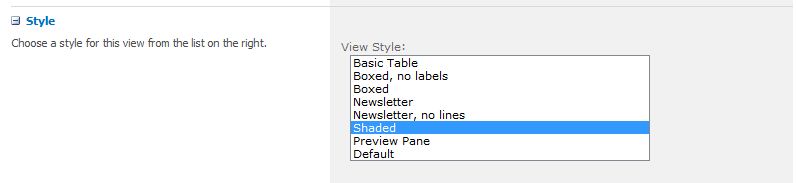
When modifying the view of a SharePoint list there are several out-of-the-box styles that you can choose from that change the look and feel of how the data is displayed. My favorite one is the Shaded Style which applies an alternating row color to the data.
shaded style

Here is a screen shot of the data on the page - I have information grouped, and when you expand the group you can see the alternating row color. Here is where the inbetweener comes in. I didn't like the out-of-the box color that was applied to the row color, so I changed it using SharePoint Designer.

alternating row color

It's not wise to modify the out-of-the box styles from sharepoint but you can override them by using the following CSS code:

.ms-alternatingstrong {
    background-color: #F2F1EC !important;
}
You should obviously #F2F1EC with your preferred color - although my warm grey is quite nice.

Tuesday, June 5, 2012

Are You an InBetweener?

I'm the webmaster at a technical college which is running SharePoint 2010 on our public website. I work with SharePoint every day and often find that I am an inbetweener - I am more than a Power User but not quite at the level of administrator. I know how things work, but often don't know how to fix them.
This blog will be dedicated to the tips and tricks I've discovered that hopefully most tech savy users (assuming you have the appropriate access) will be able to accomplish. I will strive to explain things in plain english and give step by step guidance whenever I can.